What Is a Keystone Jack and Why Every Structured Cabling System Needs One
Table of Contents
The small connector that makes or breaks your entire network.
If you’ve ever looked at the back of an ethernet wall plate and wondered what that small, snapping module actually is you’re looking at a keystone jack. It’s one of the most overlooked yet most essential components in any structured cabling system, from a home office in Dubai to a corporate data center in Riyadh, Lagos, or Nairobi.
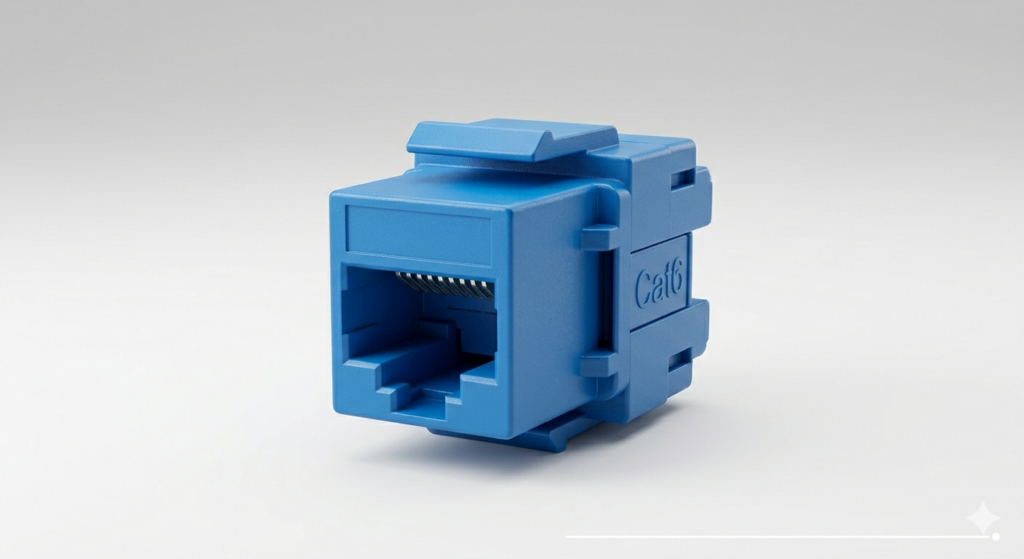
A keystone jackis a standardized, modular connector that snaps into wall plates, patch panels, and surface mount boxes. It terminates ethernet cables usually Cat5e, Cat6, or Cat6A and provides the female RJ45 port that you plug your patch cord into.
Without it, your cabling infrastructure is incomplete. It doesn’t matter how good your switches, routers, or fiber runs are if your termination points are unreliable, your network suffers. In this guide, we’ll break down exactly what a keystone jack is, the types available, how to install one correctly, and why choosing the right one matters more than most people think.
Whether you’re an IT manager in Abu Dhabi, a network installer in Nairobi, or a business owner setting up a new office in Accra, this guide gives you everything you need to make informed decisions.
What Is a Keystone Jack? (The Definitive Answer)
A keystone jack is a small, modular insert designed to fit into a standardized “keystone” cutout a rectangular opening with a specific trapezoid shape that allows the jack to click securely into place. The name “keystone” comes from the shape of the opening, which resembles a keystone in architecture.
Here’s the short, direct answer for voice search and featured snippets:
A keystone jack is a modular network connector that terminates ethernet cables (like Cat6) and provides an RJ45 female port for network access. It snaps into wall plates or patch panels and is the core termination component in structured cabling systems.
Key facts:
Dimensions: Typically 14.5mm × 16mm (standard keystone size)
Standard: TIA-568 compliant
Common categories: Cat5e, Cat6, Cat6A, Cat7
Used in: Wall outlets, patch panels, surface mount boxes, floor boxes
Wiring standards: T568A or T568B
Types of Keystone Jacks, Which One Do You Need?
Not all keystone jacks are the same. Choosing the wrong type for your application can result in signal loss, poor performance, or failed certifications. Here’s a breakdown of the most common types:
1. Cat5e Keystone Jack
Supports speeds up to 1 Gbps at 100 MHz
Suitable for basic office networking and VoIP
Cost-effective for large deployments
Best for: Small offices, older buildings, budget-conscious projects
2. Cat6 Keystone Jack
Supports up to 10 Gbps at 250 MHz (over short distances up to 55m)
Reduced crosstalk and interference vs Cat5e
Standard choice for modern commercial and enterprise networks
Best for: Corporate offices, schools, hospitals, hotels, retail spaces
3. Cat6A Keystone Jack
Supports 10 Gbps at 500 MHz over full 100m runs
Shielded (STP) versions available for high-interference environments
Larger footprint than Cat6
Best for: Data centers, industrial facilities, high-density networks
4. Cat7 / Cat8 Keystone Jack
Fully shielded, supports 25–40 Gbps
Used in spine-leaf data center architectures
Best for: Enterprise data centers, financial trading floors, broadcast studios
5. Shielded vs Unshielded Keystone Jacks
UTP (Unshielded): Standard environments, offices, homes
STP/FTP (Shielded): Industrial environments, hospitals, near electrical interference
Popular in markets like Saudi Arabia and UAE where labor efficiency matters
7. Specialty Keystone Modules
Keystone Blank: Closes unused ports
Fiber Keystone (SC/LC): For fiber optic termination
HDMI/USB Keystone: Multimedia integration
RJ11 Keystone: For telephone lines
Coax Keystone (F-type/BNC): For CCTV and antenna systems
How Does a Keystone Jack Work?
Understanding the mechanism helps you install it correctly and troubleshoot problems.
Here’s how it works step by step:
1. Cable Entry: The ethernet cable (e.g., Cat6) enters the back of the keystone jack housing.
2. Wire Separation: Each of the 8 individual conductors (4 pairs) is separated and laid into color-coded IDC slots on the back of the jack.
3. Punch-Down Connection: Using a punch-down tool (or your fingers for toolless variants), each wire is pressed into its IDC slot. The IDC blade cuts through the insulation and makes a gas-tight electrical connection no soldering needed.
4. Signal Transmission: When a patch cord is plugged into the front RJ45 female port, it completes the circuit, allowing data, PoE power, or voice signals to pass through.
5. Snap-In Mounting: The jack clicks into the keystone cutout of a wall plate, patch panel, or surface mount box, securing it in place.
The entire connection, when done correctly, maintains the cable’s electrical characteristics impedance, attenuation, return loss to the required category standard.
Ethernet Wall Jack Installation: Step-by-Step Guide
Installing a Cat6 keystone jack is a skill every IT professional and structured cabling technician needs to master. Here’s a practical, field-tested guide:
Tools You’ll Need:
Punch-down tool (110 type)
Cable stripper or utility knife
Keystone jack (Cat6 or matching cable category)
Wall plate with keystone cutout
Ethernet cable (Cat6)
Cable tester (optional but recommended)
Step 1: Prepare the Cable
Strip back approximately 25–30mm of the outer jacket using your cable stripper. Be careful not to nick the inner conductors. Untwist the pairs only as much as needed for Cat6, keep untwisting to a minimum (no more than 13mm) to preserve crosstalk performance.
Step 2: Identify the Wiring Standard
Check whether you’re using T568A or T568B. T568B is more common in commercial installations across the GCC, Africa, and internationally. Be consistent throughout your installation mixing standards causes cross-pair wiring faults.
T568B Color Code:
Pin 1: White/Orange
Pin 2: Orange
Pin 3: White/Green
Pin 4: Blue
Pin 5: White/Blue
Pin 6: Green
Pin 7: White/Brown
Pin 8: Brown
Step 3: Lay Wires into the IDC Slots
Most keystone jacks have color-coded slots labeled with both T568A and T568B markings. Lay each wire into its corresponding slot. Keep pairs as twisted as possible right up to the punch-down point.
Step 4: Punch Down the Wires
Use your 110-type punch-down tool (set to “cut” side facing outward) and press firmly on each wire. The tool will seat the wire and cut the excess simultaneously. For toolless keystone jacks, simply press the cap down until it clicks.
Step 5: Snap Into the Wall Plate
Push the terminated keystone jack into the wall plate cutout until it clicks. If there are unused cutouts, insert keystone blanks to keep dust out and maintain a professional appearance.
Step 6: Mount and Test
Mount the wall plate to the wall box or surface mount box. Use a cable tester to verify all 8 pins are wired correctly, there are no shorts or open circuits, and the installation meets category performance specifications.
Pro Tip: Always label your wall plates and patch panel ports using a consistent numbering scheme. This saves hours of troubleshooting later especially in large installations across campuses, hotels, or industrial facilities.
Why Keystone Jacks Are Critical to Structured Cabling Systems
Structured cabling is the physical backbone of any modern network. And the keystone jack is the last inch, the physical endpoint where your carefully routed, carefully installed cable meets the end user’s device.
Here’s why quality matters at this junction:
1. Performance at the Edge
A poor-quality keystone jack can degrade the entire channel. Even if you’ve installed premium Cat6A cable throughout, a cheap or incorrectly terminated jack can reduce your channel to Cat5e performance or worse. Standards like TIA-568 and ISO/IEC 11801 specify end-to-end channel performance the keystone jack is part of that channel.
2. PoE Reliability
Power over Ethernet (PoE) is everywhere IP cameras, wireless access points, IP phones, smart building sensors. PoE requires low-resistance, balanced pairs. A keystone jack with poor contact resistance increases heat, reduces power delivery efficiency, and can even damage PoE-powered devices over time.
3. Longevity and Durability
A good keystone jack is rated for 750 mating cycles minimum. In high-traffic areas, like hotel rooms, conference centers, or hospital nurse stations this matters enormously. Quality jacks from reputable brands maintain their contact integrity over years of use.
4. EMI Protection
In environments near heavy electrical equipment factories, data centers, industrial plants in locations like Tanzania, Congo (DRC), or industrial zones in the UAE shielded keystone jacks (STP/FTP) provide critical protection against electromagnetic interference.
5. Compliance and Certification
For projects that require network certification testing (as most enterprise, government, and healthcare projects do), every component in the channel including keystone jacks must be part of a certified system. Using mismatched or uncertified components can invalidate your installation warranty and test results.
Keystone Jack vs. Coupler vs. Patch Panel What’s the Difference?
This confuses a lot of buyers. Here’s a quick comparison:
Component
What It Is
Where It’s Used
Keystone Jack
Modular insert with IDC termination on one end, RJ45 female on the other
Wall plates, patch panels, surface mount boxes
Keystone Coupler
RJ45 female on both ends connects two patch cords
Extending runs, temporary connections
Patch Panel
A rack-mounted panel holding multiple keystone jacks or pre-terminated ports
Server rooms, telecom closets
Field-Term Plug
RJ45 male connector terminated directly on cable
Direct connections, shorter runs
For permanent structured cabling, keystone jacks terminated into patch panels and wall plates are always the preferred approach they’re more reliable, easier to manage, and support moves, adds, and changes without re-terminating cables.
How to Choose the Right Keystone Jack for Your Project
With so many options, here’s a practical decision framework used by structured cabling professionals:
Step 1: Match the Cable Category: Always use a keystone jack that matches or exceeds your cable category. Cat6 cable needs a Cat6 keystone jack.
Step 2: Consider the Environment
Office / commercial space: UTP Cat6 keystone jack
Industrial / near power equipment: STP/FTP shielded keystone jack
Data center: Cat6A or higher, consider angled jacks for density
Outdoor / harsh environments: Weatherproof or IP-rated versions
Step 3: Choose the Right Color Keystone jacks come in multiple colors (white, black, grey, blue, red, yellow, etc.). Using color-coding by VLAN, function, or area is a professional best practice that speeds up troubleshooting significantly.
Step 4: Toolless vs. Punch-Down For large deployments (100+ ports), toolless keystone jacks significantly reduce installation time. For smaller, precision installations, traditional punch-down jacks offer a slightly more secure mechanical connection.
Step 5: Brand and Certification Choose brands that offer system warranties and certified channel performance. Look for UL listing, RoHS compliance, TIA-568 compliance, and ISO/IEC 11801 compliance.
Common Mistakes to Avoid When Installing Keystone Jacks
Even experienced installers make these errors. Avoid them on your next project:
Untwisting pairs too much: Each pair must remain twisted as close to the IDC slots as possible. Excessive untwisting introduces near-end crosstalk (NEXT) and can push the channel below category spec.
Mixing T568A and T568B: Choose one standard and stick to it throughout. Mixing causes split-pair wiring faults that are hard to diagnose.
Not seating the jack properly: A keystone jack that’s not fully clicked into the wall plate can work loose over time, causing intermittent connectivity issues.
Using Cat5e jacks on Cat6 cable: The jack is the weak link. Even though they’re physically compatible, you’ll lose the Cat6 performance characteristics.
Skipping the cable test: Always test. A continuity test takes 30 seconds and catches wiring errors before they’re buried in walls.
Ignoring bend radius: Don’t kink the cable behind the wall plate. Maintain the minimum bend radius (4× the cable diameter for Cat6) to avoid signal degradation.
Using low-quality jacks to save cost: In a 200-port installation, saving $0.50 per jack might save $100 upfront but cause hours of troubleshooting and re-termination later.
Keystone Jack Installation in Large-Scale Projects
For enterprise projects hotels in Dubai, data centers in Riyadh, university campuses in Nairobi, government buildings in Lagos, or industrial facilities in Azerbaijan the keystone jack selection and installation process needs to be systematized:
Standardize on one category and brand across the entire project
Use color-coded jacks for different systems (data, voice, AV, security)
Document every port: wall plate ID, patch panel port, switch port
Pre-terminate in batches when possible to maintain consistency
Use certified installers for projects requiring system warranty
Plan for future upgrades: Cat6A costs more today but extends the useful life of your cabling infrastructure by a decade or more
According to the TIA (Telecommunications Industry Association), a properly installed structured cabling system should last 15–25 years and support multiple generations of active equipment. The keystone jack properly selected and installed is integral to achieving that lifespan.
Keystone Jack Standards and Compliance
If you’re operating in markets served by international standards, here’s what you need to know:
TIA-568 (USA/International): The primary North American standard, widely adopted across the GCC and Africa
ISO/IEC 11801: European/international standard, commonly specified in government and multinational projects
EN 50173: European standard, harmonized with ISO/IEC 11801
IEC 60603-7: Defines the RJ45 interface performance
RoHS Directive: Ensures freedom from hazardous substances important for projects in EU-aligned markets
For projects in regulated sectors (healthcare, government, education), ensure your keystone jacks carry the appropriate certifications. At dconnect.ae, we supply certified, standards-compliant keystone jacks and full structured cabling components for projects across the UAE and internationally.
How to Order Keystone Jacks: A Buyer’s Guide
Whether you’re ordering for a small office or a large enterprise deployment, here’s what to specify when ordering:
Checklist for Ordering:
Category (Cat5e / Cat6 / Cat6A / Cat7)
Shielded or unshielded (UTP/STP/FTP)
Toolless or punch-down
Color (white / black / blue / grey / other)
Quantity (per port + 10% spare recommended)
Matching wall plates (single / dual / quad gang)
Patch panels (if applicable)
Compatible patch cords
Packaging: Keystone jacks are typically sold in packs of 10, 25, 50, or bulk bags of 100–1000 for large projects.
Lead Times: For large quantities or specialty items (Cat6A shielded, weatherproof, angled), allow for lead time especially for projects in locations requiring import, such as Rwanda, Uganda, Ethiopia, or Somaliland.
At dconnect.ae, we stock ready-to-ship inventory for standard Cat6 keystone jacks and can source specialty items with competitive lead times. We serve clients across the UAE, GCC, and internationally contact us for bulk pricing and project support.
FAQ: Everything You Wanted to Know About Keystone Jacks
1. What is a keystone jack used for?
A keystone jack is used to terminate ethernet cables at wall outlets, patch panels, and surface mount boxes. It creates the physical connection point (RJ45 female port) where patch cords plug in, forming part of a complete structured cabling channel. Without it, you can’t create a proper, permanent ethernet connection point in a wall.
2. What’s the difference between a Cat5e and Cat6 keystone jack?
A Cat5e keystone jack is rated for 100 MHz and supports up to 1 Gbps. A Cat6 keystone jack is rated for 250 MHz and supports up to 10 Gbps over short distances. Physically, they look similar, but the internal construction of Cat6 jacks is engineered to tighter tolerances to reduce crosstalk and maintain higher performance. Always match the jack category to your cable category.
3. Do I need a special tool to install a keystone jack?
For standard punch-down keystone jacks, you need a 110-type punch-down tool a common, inexpensive tool available from any cabling supplier. For toolless keystone jacks, no tools are required; you simply press the wires into the slots and close the cap. A cable stripper is also recommended for cleanly removing the outer jacket.
4. How do I wire a Cat6 keystone jack?
Strip the cable jacket, separate the 8 conductors, and lay them into the color-coded IDC slots on the back of the jack according to the T568A or T568B standard (T568B is most common). Use a punch-down tool to seat each wire, which simultaneously cuts the excess wire. Snap the jack into a wall plate. Always test with a cable tester before closing up the wall.
5. What is the difference between T568A and T568B wiring?
Both are TIA-568 compliant wiring standards for RJ45 connectors and keystone jacks. They differ in the arrangement of the orange and green wire pairs. T568B is more common in commercial and enterprise networks worldwide. T568A is used in some government and residential applications. The important rule: use the same standard at both ends of every cable run.
6. Can I use a Cat6 keystone jack with Cat5e cable?
Yes, physically and electrically it’s compatible. However, you’ll only get Cat5e performance since the cable is the limiting factor. It’s not a problem, but don’t do it the other way around (Cat5e jack on Cat6 cable), as that limits you to Cat5e performance even with Cat6 cable.
7. How many times can a keystone jack be mated (plugged in and out)?
Quality keystone jacks are rated for a minimum of 750 mating cycles. In a standard office environment where patch cords are rarely moved, a keystone jack will last many years. In high-traffic areas (conference rooms, training facilities), consider higher-rated jacks or plan for periodic replacement as part of your maintenance schedule.
8. What is a shielded keystone jack and when do I need one?
A shielded keystone jack (STP or FTP) has a metal shell that provides protection against electromagnetic interference (EMI). You need shielded jacks when installing in environments near heavy electrical equipment, motors, industrial machinery, fluorescent lighting, or MRI machines in hospitals. If your cable is shielded (STP/FTP/SFTP), you must use shielded jacks and shielded patch cords throughout — mixing shielded and unshielded components defeats the purpose of the shielding.
9. What is a toolless keystone jack?
A toolless keystone jack uses a cap-style mechanism that allows you to seat the wires without a punch-down tool. You lay the wires in the color-coded slots and press the cap down until it clicks. They’re faster for large deployments and less likely to cause wiring errors from incorrect tool angle. The electrical performance is equivalent to traditional punch-down jacks when properly installed.
10. How many keystone jacks do I need for a project?
As a general rule, plan for one keystone jack per data port at each workstation location. A standard office workstation typically has 2 data ports (1 for data, 1 for VoIP phone). You’ll also need one keystone jack per port on your patch panels in the telecom room. Add 10% as spares. For a 50-workstation office with 2 ports each, that’s 100 wall jacks + 100 patch panel jacks + 20 spares = approximately 220 keystone jacks total.
11. Can keystone jacks be used outdoors?
Standard keystone jacks are designed for indoor use. For outdoor applications CCTV camera connection points, outdoor WAP installations, or industrial environments you need weatherproof keystone jacks or outdoor-rated surface mount boxes with IP-rated enclosures. In harsh climates common in parts of the Middle East and Africa, this is an important consideration.
12. What’s the difference between a keystone jack and a coupler?
A keystone jack has IDC wire termination on the back and an RJ45 female port on the front , it terminates a cable. A keystone coupler has RJ45 female ports on both ends, it connects two patch cords. Couplers are for extending cable runs or creating flexible connection points; they should not be used as permanent termination points in a structured cabling system.
Conclusion: The Keystone Jack Is Small But Mission-Critical
It’s easy to underestimate a component that costs just a few dollars. But when you understand that every single ethernet connection in your building passes through a keystone jack twice, once at the wall plate and once at the patch panel, you start to appreciate how important quality and correct installation really are.
A well-specified, correctly installed keystone jack delivers:
Certified category performance (Cat6, Cat6A, and beyond)
Reliable PoE delivery for cameras, access points, and IP phones
Whether you’re building a new office in Dubai, upgrading a hotel network in Riyadh, setting up a campus network in Nairobi, or deploying a data center in Lagos, the structured cabling decisions you make today will shape your network’s performance and reliability for the next 15–25 years.
Don’t let a cheap keystone jack be the weak link in your network.
Ready to Source Quality Keystone Jacks for Your Project?
dconnect.ae supplies premium structured cabling components, Cat6 keystone jacks, Cat6A shielded jacks, wall plates, patch panels, and complete cabling systems, for enterprise, government, and commercial projects across the UAE and internationally.
Visit Us: www.dconnect.ae 📞 Call Us: Contact our team for project consultation and bulk pricing Order Now: Browse our full range of keystone jacks and structured cabling products
Our team of structured cabling specialists is ready to support your project, from design and product selection to supply and technical guidance.
Talk to our experts today and secure reliable supply for your next project.
Imagine your telecom network going dark in the middle of a July afternoon in Riyadh, Dubai, or Lagos, not because of a software fault, but because the equipment inside an outdoor cabinet simply overheated. It
The small connector that makes or breaks your entire network. If you’ve ever looked at the back of an ethernet wall plate and wondered what that small, snapping module actually is you’re looking at a
Imagine deploying thousands of dollars worth of sensitive telecom equipment, routers, switches, batteries, fiber terminations, only to have them fail within months because of sand, heat, humidity, or theft. This is not a hypothetical. It
Picture this your business is growing, your team is expanding, and your IT infrastructure is getting more complex by the day. You’ve invested in servers, switches, patch panels, and cabling. But then comes the question
If your network keeps dropping, slowing down, or throwing unexplained errors, the problem might not be your internet plan or your router. It might be hiding right inside your walls, under your floors, or tucked
Maintaining a robust data center network infrastructure is essential for businesses across the UAE to ensure seamless operations and secure communication. The reliability and efficiency of your data center can significantly impact your company’s productivity,